Error: port 3000 already in use — and then the ritual:
lsof, squint, kill -9.
Wow! Signal puts the answer in your menu bar instead, with the process, its path,
and how long it has been running.
Free · macOS 14 Sonoma or later · one entitlement · no account
Tue 16:12
Ports 3 in use
3000TCP
node~/projects/shop/server.js2h ago
5432TCP
postgres/opt/homebrew/bin/postgres6d ago
53UDP
mDNSResponder/usr/sbin/mDNSResponderanother user — needs sudo
Live example — the buttons really copy, exactly as the app does.
What it shows
Everything you would have run three commands to learn.
Every listening port
TCP and UDP, IPv4 and IPv6, refreshed while you watch — not a snapshot you have to
re-run by hand.
The process behind it
Name, full path to the executable, PID, and the start time — so you can tell this
morning's dev server from the one you forgot last week.
Whose it is
Your processes and the system's are told apart, because the command that frees them
is not the same.
The right command, already adapted
One click puts kill -9 <pid> on your clipboard — with
sudo already added when the process belongs to someone else,
so it works first time.
An alert when a port is taken
Optional, and off for ports you never asked about. You find out the moment something
grabs the port you needed.
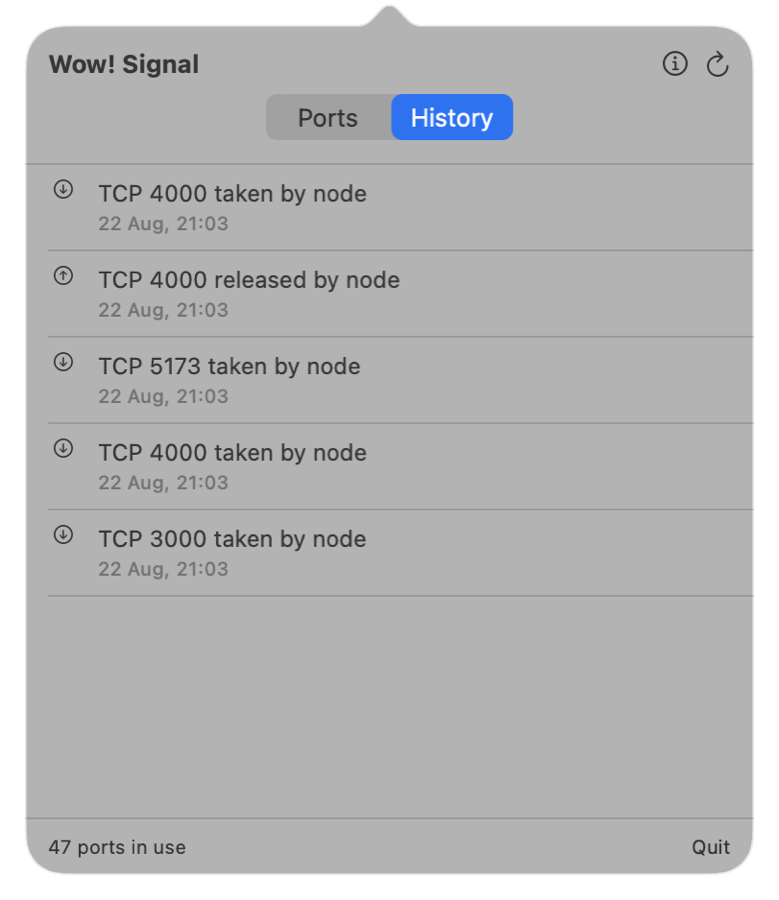
History worth keeping
What took each port and what released it, recorded as it happens — readable long
after both processes are gone.
The app itself
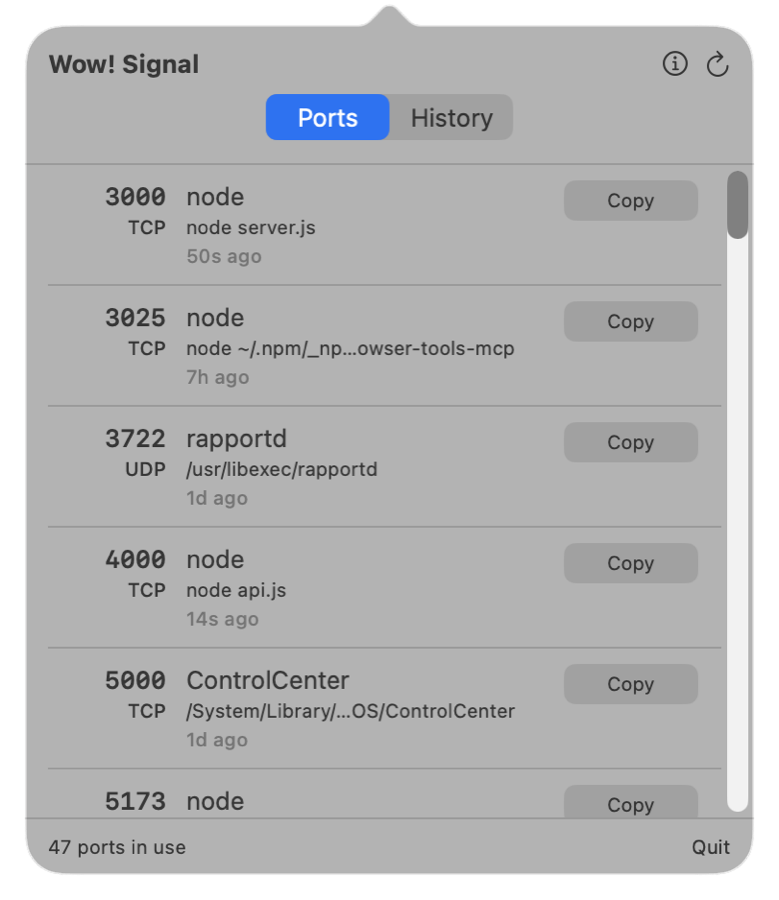
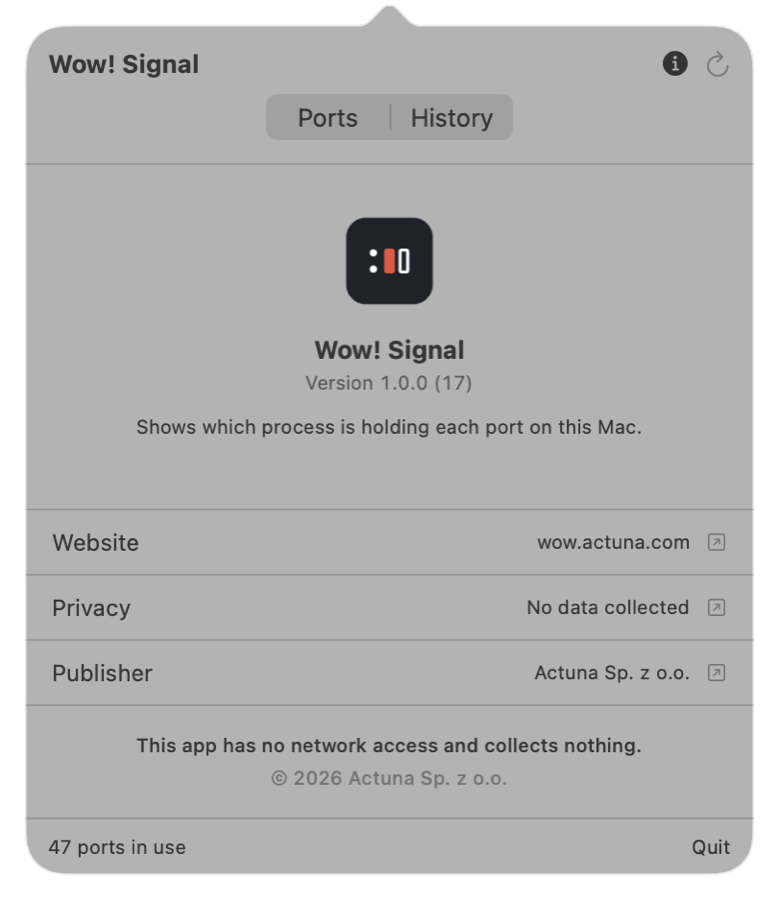
Three tabs, no window in your way.
Screenshots of the running app, not mockups.
PortsYour own processes first, one row per port and process, with the command each one is running.HistoryWhat took each port and what released it, timestamped — readable long after both processes are gone.AboutVersion, the privacy statement, and the publisher — one click away, inside the app.
How it works
Every other tool like this ships outside the App Store. Here is why this one doesn't.
The obvious implementation — shell out to lsof, then call
kill — is impossible inside the App Sandbox. So it isn't the
implementation. Everything you see comes from public, unprivileged system calls:
What you see
Where it comes from
Entitlement
Port and protocol
sysctl net.inet.{tcp,udp}.pcblist_n
none
Owning PID and user
the same call
none
Executable path
proc_pidpath()
none
Start time
proc_pidinfo(PROC_PIDTBSDINFO)
none
The lsof route needs proc_pidfdinfo,
which the sandbox restricts to your own process. It turns out not to be needed: the socket
table already carries the owner. That one fact is what lets this app exist in the store at
all — and it means the whole thing runs with a single entitlement.
What it deliberately does not do
It never kills anything.
A sandboxed app cannot signal any process outside its own sandbox — not even one you own.
There is no App Store-legal way around that, and an app promising otherwise would be
promising something it cannot deliver.
So Wow! Signal does the honest thing: it hands you the exact command and gets out of the
way. You stay in control of what gets terminated, and the command is correct for the
process in question rather than a guess you have to fix.
# your own dev server
kill -9 4821
# a system process — the plain command# would just fail with EPERMsudo kill -9 524
The app never runs these, never asks for a password, and never attempts to gain elevated
privileges.
Privacy
It cannot phone home, and you can check.
Wow! Signal declares one entitlement: the App Sandbox. It does not declare network
access, so the sandbox would refuse an outbound connection even if one were attempted.
No analytics, no crash reporter, no update check, no account.
Port history stays in the app's own container on your Mac. Deleting the app deletes it.
The App Store privacy label is Data Not Collected.
# verify it yourself, on the shipped app
codesign -d --entitlements - \
"/Applications/Wow! Signal.app"
[Dict]
[Key] com.apple.security.app-sandbox
[Value] [Bool] true
That is the whole list.
Source
The source is published so you can check.
Every claim on this page is verifiable, because the code behind it is public. Read it,
build it, audit it — confirm for yourself that the app has no network access, collects
nothing, and does exactly what it says.
This is source-available, not open source. The code remains the property
of Actuna Sp. z o.o. and is published for transparency and security review, not as a basis
for forks, derivative works or competing products. For licensing, commercial use or
partnership, write to tech@actuna.com.
There are no third-party dependencies: the app is built entirely on frameworks that ship
with macOS. Nothing is vendored, and nothing is downloaded at build time.